> ## Documentation Index
> Fetch the complete documentation index at: https://flow9.mintlify.site/llms.txt
> Use this file to discover all available pages before exploring further.
# Steps & actions
> The building blocks of a workflow — control-flow steps, the action catalogue, and the AI Worker step with its guardrails.
Inside the [Studio](/guide/workforce-studio/workflow-builder), you build a
workflow from two families of steps: **control-flow steps** that shape the path,
and **actions** that do something. The most powerful action is the **AI
Worker** step, which does the reasoning and messaging.
## Control-flow steps
These steps branch, pause, or redirect the flow.
| Step | What it does |
| --------------------- | ------------------------------------------------------------------------------------------------------------------------------------------------------------------------------ |
| **If / Else** | Branch on a condition (field, tag, channel…). Creates a **Yes** and an **Else** path. Operators: is, is not, contains, greater than, less than. |
| **Split** | A/B split contacts across paths by ratio (default 50/50). Sticky per contact, so a contact always takes the same side. |
| **Wait** | Pause the run — for a duration, until a date, for an event, or until the contact replies. |
| **Wait for approval** | Pause until a teammate approves or rejects, with a timeout. Creates an **Approved** and a **Rejected** path. See [Approvals & escalations](/guide/workforce-studio/approvals). |
| **Go to** | Jump the contact to another step in the same workflow. |
A **Go to** that loops back with no exit is blocked at publish time. Add an
**If / Else** or **Split** so the contact has a way out of the loop.
## Actions
Actions are grouped in the step picker:
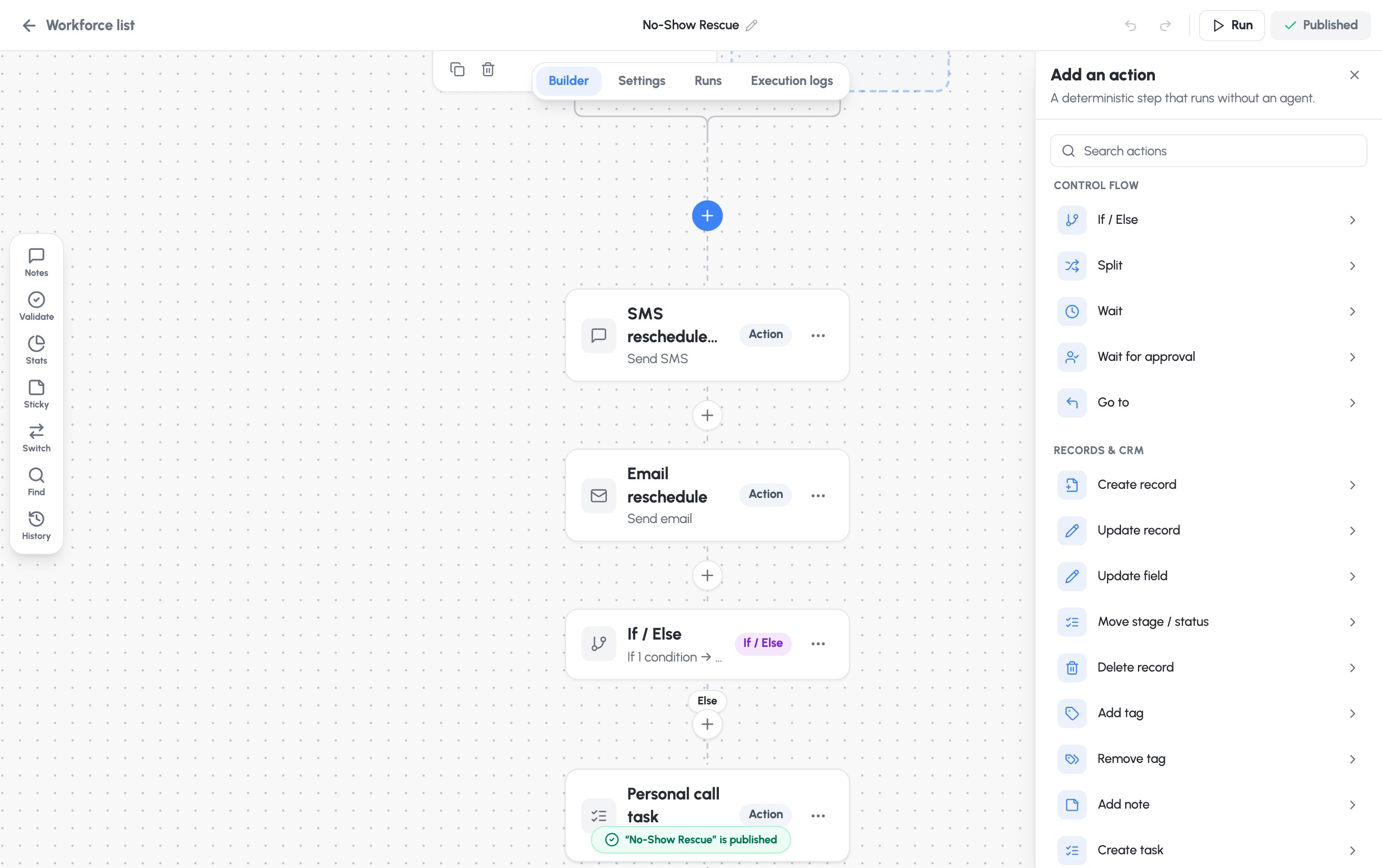 | Group | Actions |
| ------------------------- | ---------------------------------------------------------------------------------------------------------------------------------------------------------------------------------------------- |
| **Records & CRM** | Create record, Update record, Update field, Move stage / status, Delete record, Add / remove tag, Add note, Create task, Find / lookup record, Math operation, Format date / time, Format text |
| **Communication** | Send SMS, Send email, Call, Send fax — each sent to the enrolled contact or a custom value |
| **Routing & people** | Assign / route (user, round-robin, or team), Internal notify (in-app / email / SMS), Contact Centre handoff |
| **Scheduling** | Appointment — book, reschedule, cancel, or send a booking link |
| **Compliance** | Consent / opt-out — mark opt-out, update consent, or suppress from sends |
| **Integrations & custom** | Outbound webhook (POST / PUT / GET, with headers and a JSON payload) |
| **Workforce flow** | Add to Workforce (honours its re-entry rules), Remove from Workforce (cancels its runs) |
| **AI** | **AI Worker** — hand off to an agentic AI Worker to drive an outcome |
**Metered actions.** Send SMS, Call, Send fax, and the AI Worker step consume
usage and appear in your [ROI dashboard and billing](/guide/workforce-studio/roi-and-usage).
Send email and outbound webhooks are not metered.
### Sticky notes
Add **Sticky** notes from the left toolbar to annotate the canvas for your
teammates. They're not part of the flow and never block publishing.
## The AI Worker step
The **AI Worker** step is an agentic step: given plain-language instructions, it
reasons over the contact's context and drives an outcome on a channel. Add it
from the **AI** group in the step picker, then configure it.
**Safe by default.** An unconfigured worker has no tools and can't change any
record. It gains abilities only from what you grant below — and those limits
are enforced on the server, not just in the app.
| Group | Actions |
| ------------------------- | ---------------------------------------------------------------------------------------------------------------------------------------------------------------------------------------------- |
| **Records & CRM** | Create record, Update record, Update field, Move stage / status, Delete record, Add / remove tag, Add note, Create task, Find / lookup record, Math operation, Format date / time, Format text |
| **Communication** | Send SMS, Send email, Call, Send fax — each sent to the enrolled contact or a custom value |
| **Routing & people** | Assign / route (user, round-robin, or team), Internal notify (in-app / email / SMS), Contact Centre handoff |
| **Scheduling** | Appointment — book, reschedule, cancel, or send a booking link |
| **Compliance** | Consent / opt-out — mark opt-out, update consent, or suppress from sends |
| **Integrations & custom** | Outbound webhook (POST / PUT / GET, with headers and a JSON payload) |
| **Workforce flow** | Add to Workforce (honours its re-entry rules), Remove from Workforce (cancels its runs) |
| **AI** | **AI Worker** — hand off to an agentic AI Worker to drive an outcome |
**Metered actions.** Send SMS, Call, Send fax, and the AI Worker step consume
usage and appear in your [ROI dashboard and billing](/guide/workforce-studio/roi-and-usage).
Send email and outbound webhooks are not metered.
### Sticky notes
Add **Sticky** notes from the left toolbar to annotate the canvas for your
teammates. They're not part of the flow and never block publishing.
## The AI Worker step
The **AI Worker** step is an agentic step: given plain-language instructions, it
reasons over the contact's context and drives an outcome on a channel. Add it
from the **AI** group in the step picker, then configure it.
**Safe by default.** An unconfigured worker has no tools and can't change any
record. It gains abilities only from what you grant below — and those limits
are enforced on the server, not just in the app.
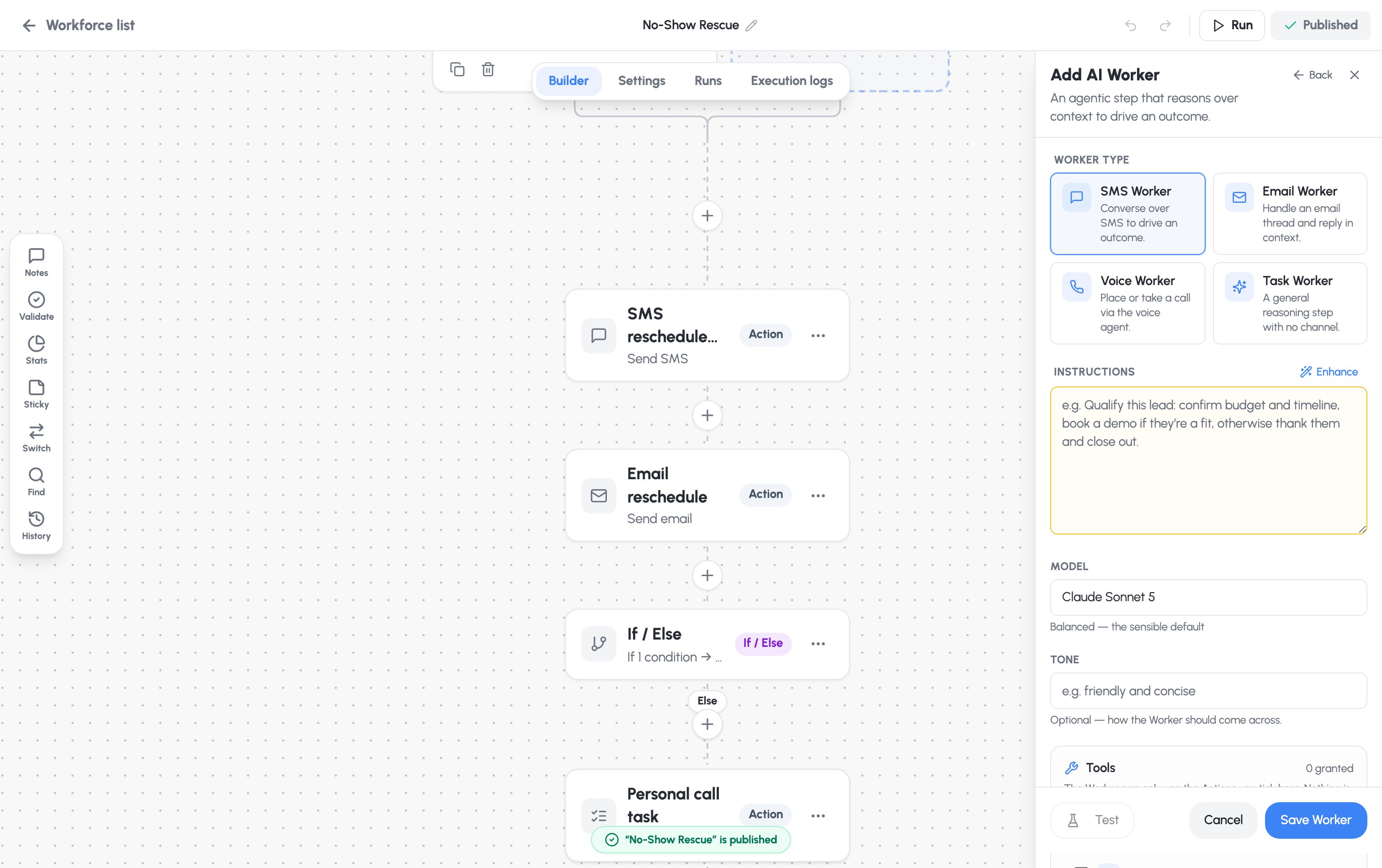 ### Choose a worker type
| Type | Does |
| ---------------- | -------------------------------------------- |
| **SMS Worker** | Converse over SMS to drive an outcome. |
| **Email Worker** | Handle an email thread and reply in context. |
| **Voice Worker** | Place or take a call via the voice agent. |
| **Task Worker** | A general reasoning step with no channel. |
### Instructions and model
* **Instructions** — a plain-language objective. The **Enhance** button
scaffolds an Objective / Guidelines / Success-looks-like structure for you.
* **Model** — choose the reasoning model:
* **Claude Opus 4.8** — most capable, for the hardest reasoning
* **Claude Sonnet 5** — balanced; the sensible default
* **Claude Haiku 4.5** — fastest and cheapest, for simple tasks
* **Tone** *(optional)* — how the worker should come across.
**Voice Workers** also set a **Persona**, **Voice**, and **Language**, and link
a **voice agent** with a calling number (use **Sync voice agent** to provision
it).
### Grant tools and write-back
* **Tools** — the worker can only use the actions you tick here. Nothing is
granted by default.
* **Field write-back** — the only record fields the worker may change. For each
field, choose **AI decides the value** or **You set a fixed value**. A fixed
value can't be changed even by a jailbroken worker.
### Guardrails
Guardrails are **on by default** — every worker must have a way to hand off to a
human:
| Guardrail | What it does |
| ----------------------------- | -------------------------------------------------------------------------------------- |
| **Max steps per run** | A hard ceiling on the worker's reasoning/tool turns (default 6). |
| **Escalate to a human when…** | **Required.** The condition that hands the run off to a person. |
| **Usage cap per run** | Optional — stop the run after this much spend. Blank = no cap. |
| **Quiet hours** | No outbound contact in this window (default 21:00–08:00). Not for Task Workers. |
| **AI disclosure** | **Required for Voice Workers** — spoken at the start of the call (EU AI Act, Art. 50). |
### Practice mode vs. live
**Perform actions for real** is **off** by default. While it's off, the worker
only records what it *would* do — nothing is sent or changed, which is ideal
while you're configuring. Turn it on only when you're ready:
With **Perform actions for real** on, the worker runs its granted actions for
real: CRM changes apply immediately and outbound messages are queued for
sending. Test it first.
You can **Test** a worker against a sample message right from its panel before
saving. Incomplete workers can still be **saved**, but publishing is blocked
until required fields (like instructions and an escalation condition) are set.
### Choose a worker type
| Type | Does |
| ---------------- | -------------------------------------------- |
| **SMS Worker** | Converse over SMS to drive an outcome. |
| **Email Worker** | Handle an email thread and reply in context. |
| **Voice Worker** | Place or take a call via the voice agent. |
| **Task Worker** | A general reasoning step with no channel. |
### Instructions and model
* **Instructions** — a plain-language objective. The **Enhance** button
scaffolds an Objective / Guidelines / Success-looks-like structure for you.
* **Model** — choose the reasoning model:
* **Claude Opus 4.8** — most capable, for the hardest reasoning
* **Claude Sonnet 5** — balanced; the sensible default
* **Claude Haiku 4.5** — fastest and cheapest, for simple tasks
* **Tone** *(optional)* — how the worker should come across.
**Voice Workers** also set a **Persona**, **Voice**, and **Language**, and link
a **voice agent** with a calling number (use **Sync voice agent** to provision
it).
### Grant tools and write-back
* **Tools** — the worker can only use the actions you tick here. Nothing is
granted by default.
* **Field write-back** — the only record fields the worker may change. For each
field, choose **AI decides the value** or **You set a fixed value**. A fixed
value can't be changed even by a jailbroken worker.
### Guardrails
Guardrails are **on by default** — every worker must have a way to hand off to a
human:
| Guardrail | What it does |
| ----------------------------- | -------------------------------------------------------------------------------------- |
| **Max steps per run** | A hard ceiling on the worker's reasoning/tool turns (default 6). |
| **Escalate to a human when…** | **Required.** The condition that hands the run off to a person. |
| **Usage cap per run** | Optional — stop the run after this much spend. Blank = no cap. |
| **Quiet hours** | No outbound contact in this window (default 21:00–08:00). Not for Task Workers. |
| **AI disclosure** | **Required for Voice Workers** — spoken at the start of the call (EU AI Act, Art. 50). |
### Practice mode vs. live
**Perform actions for real** is **off** by default. While it's off, the worker
only records what it *would* do — nothing is sent or changed, which is ideal
while you're configuring. Turn it on only when you're ready:
With **Perform actions for real** on, the worker runs its granted actions for
real: CRM changes apply immediately and outbound messages are queued for
sending. Test it first.
You can **Test** a worker against a sample message right from its panel before
saving. Incomplete workers can still be **saved**, but publishing is blocked
until required fields (like instructions and an escalation condition) are set.