> ## Documentation Index
> Fetch the complete documentation index at: https://flow9.mintlify.site/llms.txt
> Use this file to discover all available pages before exploring further.
# Tour the dashboard
> A quick orientation to the Funnel navigation and where everything lives.
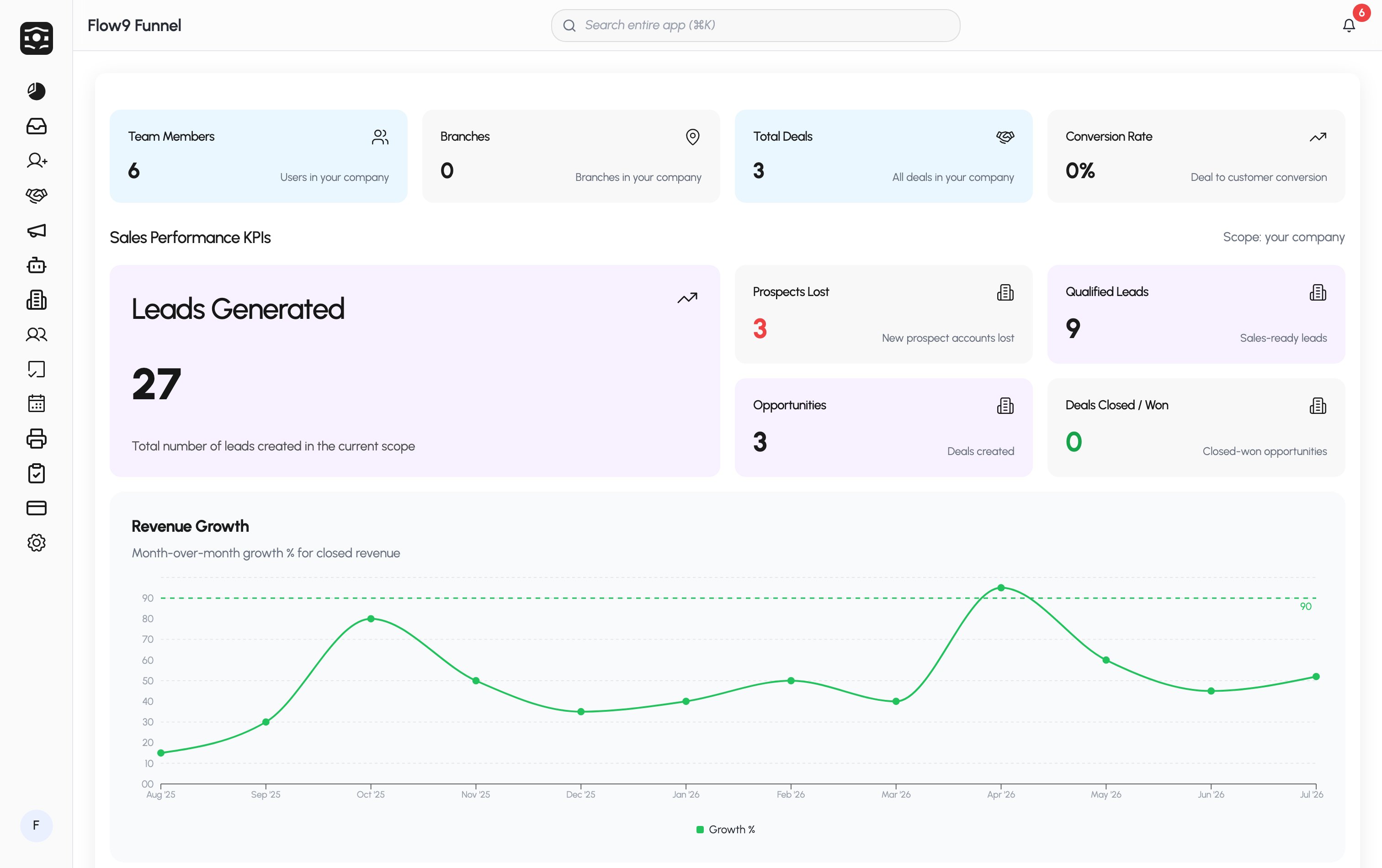 When you sign in, you land on the **Dashboard** — your workspace's analytics overview. The sidebar is organized around how you work:
| Section | What's there |
| ---------------------------------------- | ----------------------------------------------------- |
| **Dashboard** | Key metrics for your pipeline and team |
| **Leads / Deals / Customers / Accounts** | Your core CRM records |
| **Tasks** | Your to-dos and follow-ups, including recurring tasks |
| **AI Campaigns** | Outbound voice, SMS, and email campaigns |
| **Inbox** | Unified email and message threads |
| **Reports** | Custom report builder |
| **Settings** | Workspace configuration (admins) |
At the bottom of the sidebar, your avatar shows a progress ring while onboarding is incomplete, and the avatar menu carries a **Complete onboarding (n%)** shortcut. See [Set up your workspace](/guide/onboarding).
What you see depends on your role and your company's plan — for example, **Workforce** and **Fax** appear only when enabled for your workspace, and Settings is visible to admins.
At the bottom of the sidebar, your avatar shows a progress ring while onboarding is incomplete, and the avatar menu carries a **Complete onboarding (n%)** shortcut. See [Set up your workspace](/guide/onboarding).
What you see depends on your role and your company's plan — for example, **Workforce** and **Fax** appear only when enabled for your workspace, and Settings is visible to admins.
When you sign in, you land on the **Dashboard** — your workspace's analytics overview. The sidebar is organized around how you work:
| Section | What's there |
| ---------------------------------------- | ----------------------------------------------------- |
| **Dashboard** | Key metrics for your pipeline and team |
| **Leads / Deals / Customers / Accounts** | Your core CRM records |
| **Tasks** | Your to-dos and follow-ups, including recurring tasks |
| **AI Campaigns** | Outbound voice, SMS, and email campaigns |
| **Inbox** | Unified email and message threads |
| **Reports** | Custom report builder |
| **Settings** | Workspace configuration (admins) |
At the bottom of the sidebar, your avatar shows a progress ring while onboarding is incomplete, and the avatar menu carries a **Complete onboarding (n%)** shortcut. See [Set up your workspace](/guide/onboarding).
What you see depends on your role and your company's plan — for example, **Workforce** and **Fax** appear only when enabled for your workspace, and Settings is visible to admins.
At the bottom of the sidebar, your avatar shows a progress ring while onboarding is incomplete, and the avatar menu carries a **Complete onboarding (n%)** shortcut. See [Set up your workspace](/guide/onboarding).
What you see depends on your role and your company's plan — for example, **Workforce** and **Fax** appear only when enabled for your workspace, and Settings is visible to admins.